

Introductions New to CMOC? Introduce yourself and your Mustang!

Newbie

Thread Tools
 
Search this Thread
 
Old Jul 6, 2013 | 09:42 AM
  #1  
Ldystng's Avatar
Thread Starter
CMOC Newbie
 
Joined: Jul 2013
Posts: 8
From: Medicine Hat Alberta
Newbie

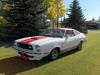
Hello Everyone, I'm new to this. Just bought a 77 Cobra II, (sold my 91 GT Cobra convertible after 22 years) Hoping to enjoy this just as much
Old Jul 6, 2013 | 10:04 AM
  #2  
DublDee's Avatar
Retired Moderator
 
Joined: Mar 2009
Posts: 3,079
From: Lloydminster, Sask.
Hey welcome to CMOC. Post some pics when you can.
Old Jul 6, 2013 | 10:05 AM
  #3  
Ray Spencer's Avatar
CMOC Supreme poster
 
Joined: Dec 2007
Posts: 2,437
From: Sherwood Park, Alberta
Welcome to the site.
Old Jul 6, 2013 | 10:08 AM
  #4  
Ldystng's Avatar
Thread Starter
CMOC Newbie
 
Joined: Jul 2013
Posts: 8
From: Medicine Hat Alberta
Thank you for the welcome, can't get a picture uploaded.....it keeps failing..lol
Old Jul 6, 2013 | 10:13 AM
  #5  
DublDee's Avatar
Retired Moderator
 
Joined: Mar 2009
Posts: 3,079
From: Lloydminster, Sask.
Make sure it's the right size, if its too large you may have to resize it.
Old Jul 6, 2013 | 10:15 AM
  #6  
def67's Avatar
Silly Milly
 
Joined: May 2010
Posts: 2,958
From: Taber Alberta
Hello and welcome!
Old Jul 6, 2013 | 10:16 AM
  #7  
Ldystng's Avatar
Thread Starter
CMOC Newbie
 
Joined: Jul 2013
Posts: 8
From: Medicine Hat Alberta
Originally Posted by DublDee
Make sure it's the right size, if its too large you may have to resize it.
I have done that got a pic in album, but would like to put under under my username like yours.....
Old Jul 6, 2013 | 10:20 AM
  #8  
DublDee's Avatar
Retired Moderator
 
Joined: Mar 2009
Posts: 3,079
From: Lloydminster, Sask.
Originally Posted by Ldystng
I have done that got a pic in album, but would like to put under under my username like yours.....
On the top listings go to the "quick links" and down to edit your details and on the left there will be a bunch of selections, select edit avatar. Then if you have your picture saved in your computer hit the Choose file button and find your picture. After the pic shows up in the square picture box make sure you save changes at the bottom. Hope this helps.
Old Jul 6, 2013 | 10:21 AM
  #9  
DublDee's Avatar
Retired Moderator
 
Joined: Mar 2009
Posts: 3,079
From: Lloydminster, Sask.
By the way I love the white with red stripes, looks really good!
Old Jul 6, 2013 | 10:21 AM
  #10  
Ldystng's Avatar
Thread Starter
CMOC Newbie
 
Joined: Jul 2013
Posts: 8
From: Medicine Hat Alberta
Originally Posted by DublDee
On the top listings go to the "quick links" and down to edit your details and on the left there will be a bunch of selections, select edit avatar. Then if you have your picture saved in your computer hit the Choose file button and find your picture. After the pic shows up in the square picture box make sure you save changes at the bottom. Hope this helps.
Thank you so much for your help!


All times are GMT -5. The time now is 10:33 AM.